rLLM Agent Run Format
This page gives a high-level view of the internal data progression in rLLM:
Step -> Trajectory -> Episode -> TrajectoryGroup.
If you need exact field-level APIs, see rLLM Data Structures API.
Two valid views of the same rollout data
- Workflow view:
Episodecaptures what happened in one rollout execution. - Algorithm view:
TrajectoryGroupcaptures which trajectories should be compared together for training.
1. Step: The Atomic Rollout Unit
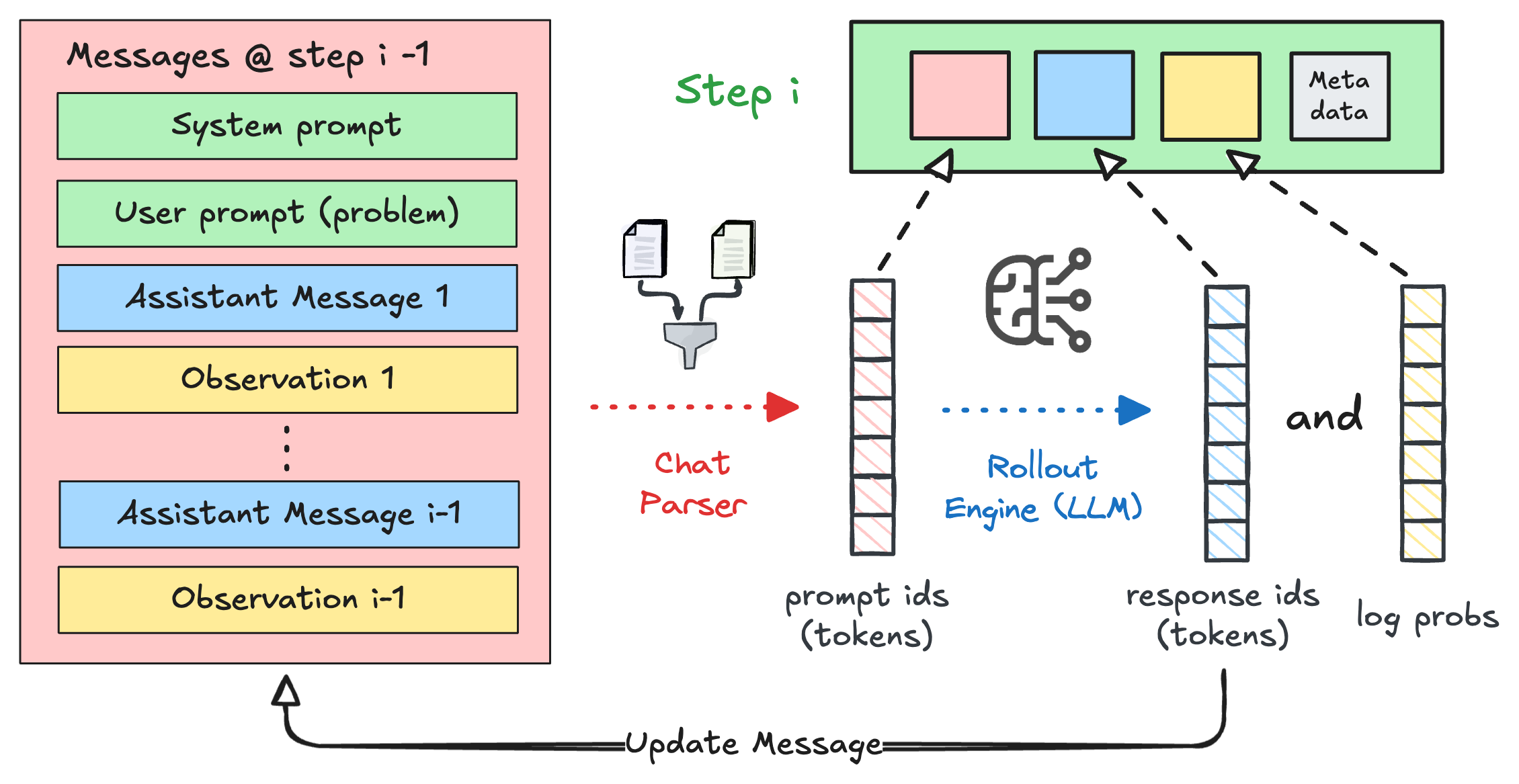
A Step is the smallest training-relevant unit in an rLLM run. It captures one model interaction:
- input token IDs (
prompt_ids) - output token IDs (
response_ids) - token-level log probabilities (
logprobs)
At workflow runtime, a Step also carries agent/environment context (messages, observations, actions, rewards).
This makes it both:
- an execution-time state container, and
- a training-time token record for policy optimization.
2. Trajectory: Same-Role Steps Sharing Outcome
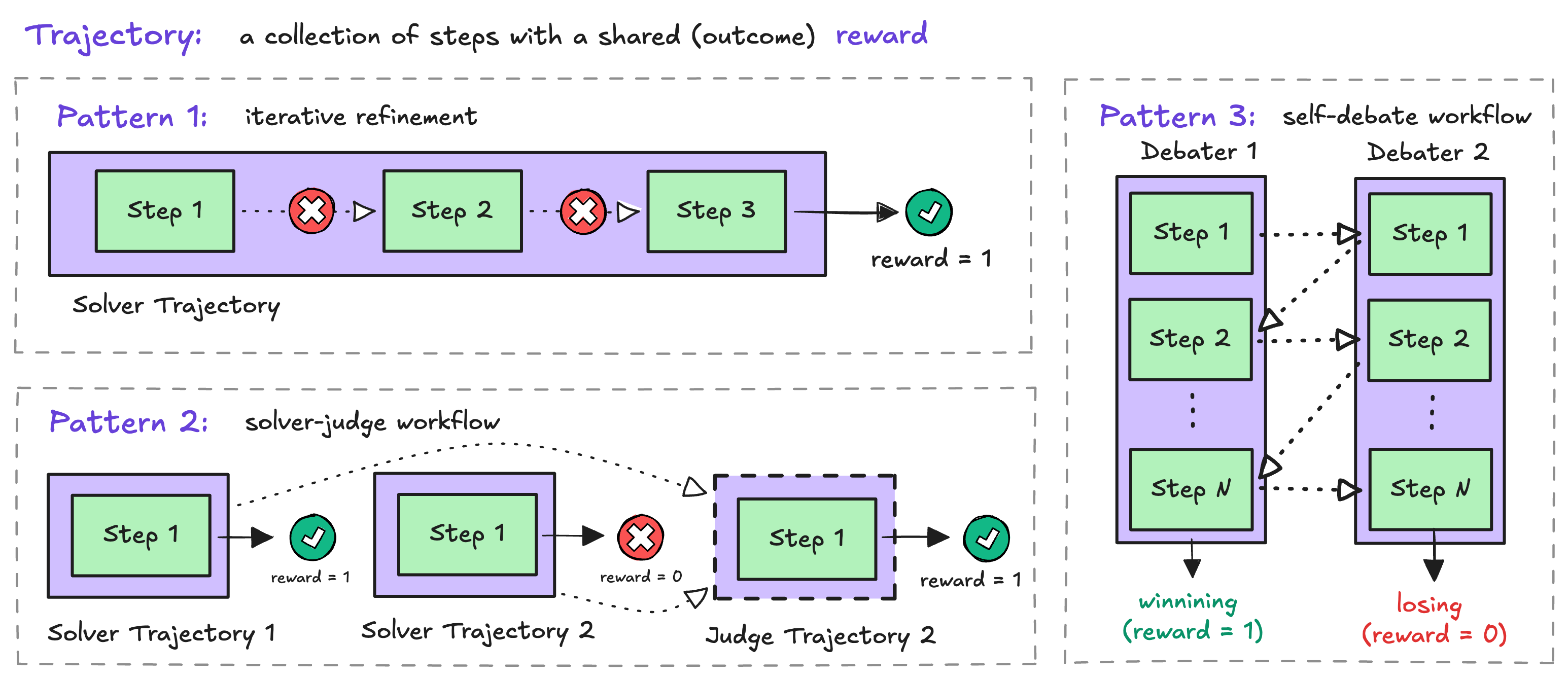
A Trajectory is an ordered list of Steps from a single role (for example, solver, judge, or debater_1).
In rLLM RLVR-style workflows, steps inside one trajectory are intended to share the same outcome signal at training time. Concretely:
- trajectory-level reward is represented as
trajectory.reward - in common broadcast-mode training, the same trajectory-level advantage is applied to every step in that trajectory
This is an intentional design decision. If you need different reward/advantage behavior across different phases, split them into separate trajectories instead of mixing them into one.
3. Episode: Workflow/Agent-Level Grouping
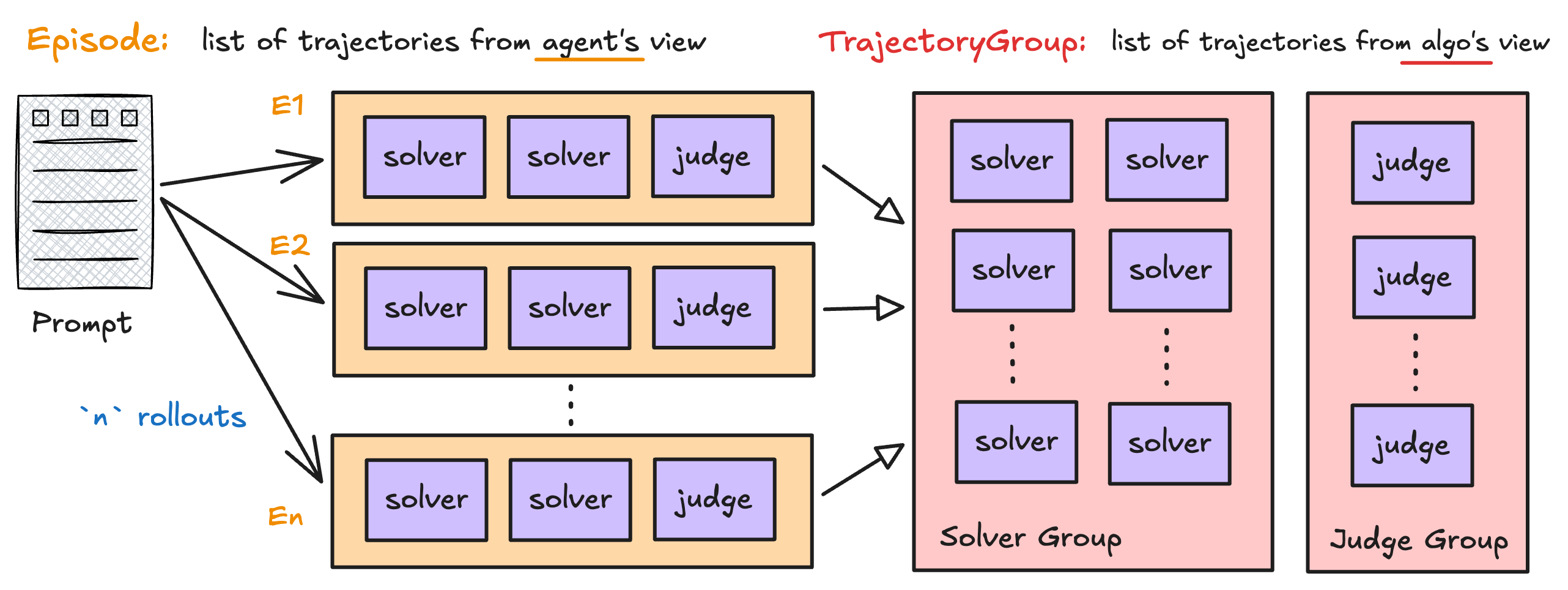
An Episode is what Workflow.run(...) returns for one rollout.
It groups all trajectories produced in that rollout, potentially from multiple roles.
Example (solver-judge): a single episode may contain
solvertrajectory #1solvertrajectory #2judgetrajectory #1
From the workflow engine view, this is the natural unit of execution and logging.
Its ID is rollout-scoped ({task_id}:{rollout_idx}), and it carries workflow metrics (is_correct, per-episode metadata).
4. Why TrajectoryGroup Exists
TrajectoryGroup is not a workflow concept; it is an algorithm concept.
RL algorithms compare rewards among trajectories that should be contrasted together (for example, GRPO over same-role rollouts). This comparison set is usually different from episode boundaries, so rLLM introduces a dedicated grouping object.
By default (transform_episodes_to_trajectory_groups), rLLM:
- Optionally imputes missing trajectory names (position-based)
- Builds groups by
(task_id, trajectory.name) - Validates reward consistency and propagates from last step reward when needed (broadcast mode)
- Stores per-trajectory metadata (rollout index, correctness, termination reason)
Result: algorithms receive data in the shape they need, without forcing workflow authors to organize episodes for optimizer logic.
Image placeholder: [episode-to-trajectory-group.png]
5. Runtime Transformation: Episode -> TrajectoryGroup
In the unified training pipeline:
- Workflow engine produces
list[Episode] - Transform pipeline converts them to
list[TrajectoryGroup] - Advantage estimators operate on groups (and role partitions)
This separation lets one workflow representation serve different algorithmic views.
For solver-judge, default grouping typically yields:
- a
solvergroup with solver trajectories across rollouts for the same task - a
judgegroup with judge trajectories across rollouts for the same task
6. Overriding Default Grouping
As for rLLM v0.3, this remains an experimental feature shipped with the Unified Trainer
If you are still using the legacy trainers (agent_workflow_trainer for Verl or tinker_workflow_trainer for Tinker), the grouping rules are not explicit, and the stepwise advantage computation pattern follows the Stepwise GRPO guide.
You can override grouping by passing traj_grouping_hook to AgentTrainer / UnifiedTrainer.
from rllm.agents.agent import Episode, TrajectoryGroup
from rllm.experimental.common.config import CompactFilteringConfig, TransformConfig

def my_traj_grouping_hook(
    episodes: list[Episode],
    transform_config: TransformConfig,
    compact_filtering_config: CompactFilteringConfig | None = None,
) -> list[TrajectoryGroup]:
    ...
    return groups
Important expectations:
- return
list[TrajectoryGroup]with valid rewards for downstream estimators - keep trajectory objects by reference (do not deep-copy) so trainer-side updates remain consistent
Use this when your algorithm needs non-default contrast sets (for example, cross-role or custom tournament grouping).
Default grouping in one line
group_id = f"{task_id}:{trajectory.name}", then all trajectories with the same group_id are compared together.