rLLM UI
Repository: rllm-org/rllm-ui
Web interface for monitoring and analyzing training runs in real time. Think of wandb dedicated to rLLM, with powerful features such as episode/trajectory search, observability AI agent and more. Only supports training runs using Unified Trainer.
Features
- Real-time Dashboard — Live metrics charts with SSE streaming, multi-experiment overlay with custom colors
- Episode & Trajectory Inspection — Browse/search episodes, inspect agent trajectories step-by-step (observations, actions, rewards), view it in trajectory groups
- Training Logs — Live stdout/stderr capture with ANSI color support, search with match navigation
- Code & Config Visibility — View extracted workflow/agent source code, Hydra config snapshots
- Observability AI Agent — Query your training data using natural language
Getting Started
There are two ways to access rLLM UI:
- Cloud — Use our hosted service at ui.rllm-project.com. No setup required.
- Self-hosted — Run locally from the repository (see below).
Regardless of the service you use, add ui to your trainer's logger list in your rLLM training script:
How It Works
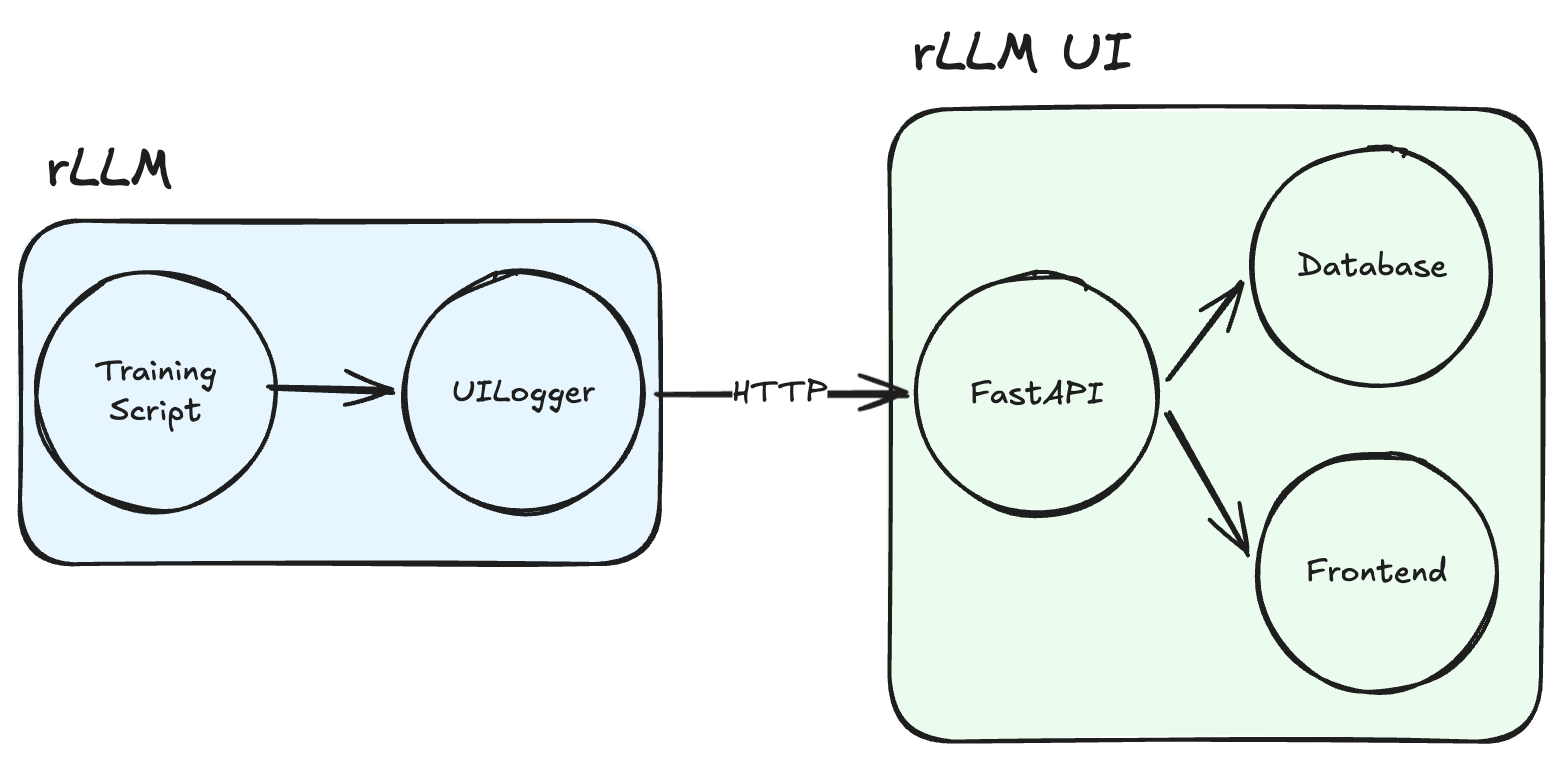
rLLM connects to the UI via the UILogger backend, registered as "ui" in the Tracking class (rllm/utils/tracking.py).
On init, the logger:
- Creates a training session via
POST /api/sessions - Starts a background heartbeat thread (for crash detection)
- Wraps
stdout/stderrwithTeeStreamto capture training logs
During training, the logger sends data over HTTP.
So the overall flow looks like:
Cloud Setup
- Sign up at ui.rllm-project.com
- Copy your API key (shown once at registration)
- Set the key in your training environment (either through export or in
.env)
That's it. Run your training script with 'ui' included, and you will see your training runs real-time.
| Variable | Required | Scope | Default | Description |
|---|---|---|---|---|
RLLM_API_KEY |
Yes | Training script env | — | API key for authenticating training data ingestion (shown once at registration) |
RLLM_UI_URL |
No | Training script env | https://ui.rllm-project.com |
Defaults to cloud URL when RLLM_API_KEY is set |
AI Agent
The observability AI agent can be enabled from the Settings page in the UI by entering your ANTHROPIC_API_KEY there.
Self-hosted Setup
git clone https://github.com/rllm-org/rllm-ui.git
cd rllm-ui

# Install dependencies
cd api && pip install -r requirements.txt
cd ../frontend && npm install

# Run (two terminals)
cd api && uvicorn main:app --reload --port 3000
cd frontend && npm run dev
Open http://localhost:5173 (or the port shown in the Vite output).
Custom API port
If you run the API on a port other than 3000, update both sides so they know where to find it:
- rLLM training side —
export RLLM_UI_URL="http://localhost:<port>" - rllm-ui frontend — set
VITE_API_URL=http://localhost:<port>infrontend/.env.development
Database
rLLM UI stores sessions, metrics, episodes, trajectories, and logs in a database so they persist across restarts and are searchable.
- SQLite (default) — No setup required. A local file (
api/rllm_ui.db) is created on first run. - PostgreSQL — Adds full-text search with stemming and relevance ranking. Set
DATABASE_URLinapi/.env:
Observability AI Agent
rLLM UI includes a built-in AI agent that can query your training data using natural language. Currently experimental — more support coming soon. To enable it, set your Anthropic API key in api/.env:
Configuration
| Variable | Required | Scope | Default | Description |
|---|---|---|---|---|
RLLM_UI_URL |
No | Training script env | http://localhost:3000 |
URL of your local rllm-ui server |
DATABASE_URL |
No | api/.env |
SQLite | PostgreSQL connection string. Defaults to SQLite if unset. |
ANTHROPIC_API_KEY |
No | api/.env |
— | Enables the built-in AI agent |
VITE_API_URL |
No | frontend/.env.development |
http://localhost:3000 |
Only needed if the API runs on a non-default port |