Train LangGraph RAG Agent with rLLM SDK
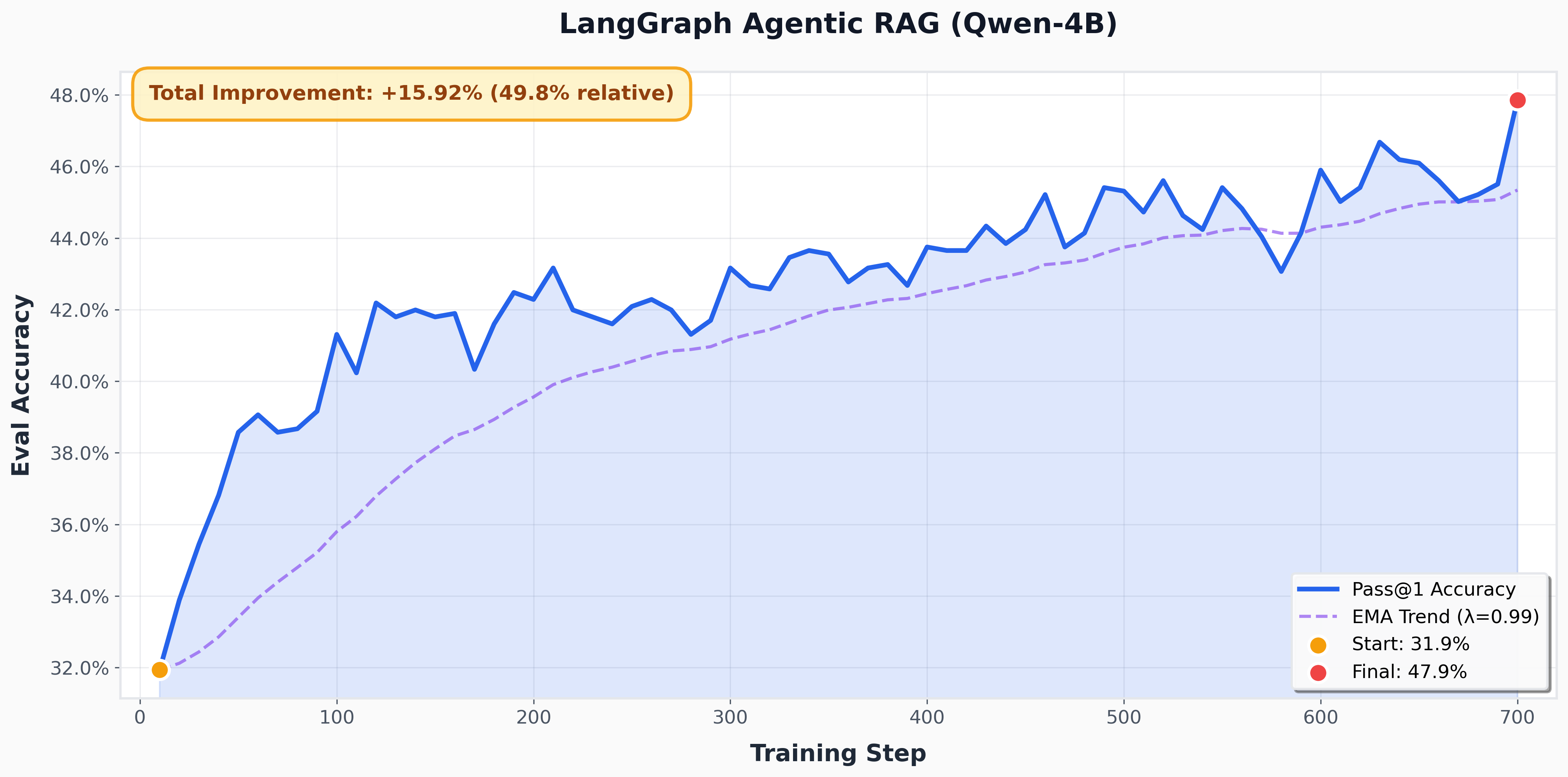
In this tutorial, you'll train a retrieval-augmented generation (RAG) agent built with LangGraph. This demonstrates that rLLM SDK works seamlessly with popular agent frameworks—your LangGraph code runs unchanged.
Overview
By the end of this tutorial, you will have:
- Built a LangGraph agent with retrieval tool calling
- Injected rLLM SDK tracing into LangChain's ChatOpenAI
- Trained the agent to search effectively using RL
Concepts
We will cover:
- Client injection: Swap ChatOpenAI's internal client with traced SDK client
- LangGraph workflow: StateGraph, nodes, edges, and
tools_condition - Multi-turn tracing: All LLM calls in an agentic loop are captured
Setup
Move to rllm folder, install dependencies:
Download HotpotQA dataset, Wikipedia corpus and pre-built FAISS indices:
cd examples/sdk/langgraph
python data/prepare_hotpotqa_data.py
python data/download_search_data.py --data_dir ./search_data
cat search_data/prebuilt_indices/part_aa search_data/prebuilt_indices/part_ab > search_data/prebuilt_indices/e5_Flat.index
mv search_data/wikipedia/wiki-18.jsonl search_data/prebuilt_indices/corpus.json
Install env for retrieval server (Recommend start fresh env)
conda create -n rag-server python=3.10 pip -y
pip install faiss-gpu==1.7.2 Flask numpy==1.26.4 sentence-transformers torch
Start the retrieval server on port 9002:
Start the vLLM server on port 4000 for testing:
vllm serve Qwen/Qwen3-4B \
    --host 0.0.0.0 \
    --port 4000 \
    --enable-auto-tool-choice \
    --tool-call-parser hermes
1. Client Injection
LangChain's ChatOpenAI accepts custom client and async_client parameters. By injecting our traced clients, all LLM calls flow through our proxy automatically.
1.1 Normal LangChain (no tracing)
from langchain_openai import ChatOpenAI

# Standard usage - no tracing
llm = ChatOpenAI(
    model="Qwen/Qwen3-4B",
    api_key="token-abc123"
)
1.2 With rLLM SDK tracing
from langchain_openai import ChatOpenAI
from rllm.sdk import get_chat_client, get_chat_client_async

# Create traced clients
sync_client = get_chat_client(
    base_url="http://localhost:4000/v1",
    api_key="token-abc123"
)
async_client = get_chat_client_async(
    base_url="http://localhost:4000/v1",
    api_key="token-abc123"
)

# Inject into ChatOpenAI
llm = ChatOpenAI(
    model="Qwen/Qwen3-4B",
    client=sync_client, # ← Traced!
    async_client=async_client, # ← Traced!
)
That's it! Your LangGraph agent now has full tracing with zero code changes to the workflow logic.
2. Build the LangGraph Agent
2.1 Import dependencies
import os
import re
from langchain_openai import ChatOpenAI
from langgraph.graph import END, START, MessagesState, StateGraph
from langgraph.prebuilt import ToolNode, tools_condition

from rllm.sdk import get_chat_client, get_chat_client_async
2.2 Configure the model with traced clients
MODEL = "Qwen/Qwen3-4B"
MAX_RESPONSE_TOKENS = 2048

# Create traced clients
async_client = get_chat_client_async(
    base_url="http://localhost:4000/v1",
    api_key="token-abc123",
)

sync_client = get_chat_client(
    base_url="http://localhost:4000/v1",
    api_key="token-abc123",
)

# Inject into ChatOpenAI
response_model = ChatOpenAI(
    model=MODEL,
    temperature=1.0,
    max_tokens=MAX_RESPONSE_TOKENS,
    async_client=async_client,
    client=sync_client,
)
2.3 Define the retrieval tool
from local_retrieval_tool import to_langchain_tool

retriever_tool = to_langchain_tool(
    server_url="http://127.0.0.1:9002",
    max_results=5,
    timeout=30.0,
)
2.4 Create the agent node
SYSTEM_PROMPT = """You are a helpful AI assistant that can search for information.

When answering questions:
1. Use the search tool to find relevant information
2. Synthesize information from multiple sources
3. Put your final answer in \\boxed{} format

Example: \\boxed{Paris}"""

async def agent_step(state: MessagesState):
    """Agent decides: call tools or provide final answer."""
    response = await response_model.bind_tools([retriever_tool]).ainvoke(
        state["messages"]
    )
    return {"messages": [response]}
2.5 Assemble the graph
workflow = StateGraph(MessagesState)

# Add nodes
workflow.add_node("agent", agent_step)
workflow.add_node("tools", ToolNode([retriever_tool]))

# Add edges
workflow.add_edge(START, "agent")
workflow.add_conditional_edges(
    "agent",
    tools_condition,  # Routes to "tools" or END based on tool calls
    {
        "tools": "tools",
        END: END,
    },
)
workflow.add_edge("tools", "agent")

# Compile
graph = workflow.compile()
2.6 Test the graph
async def test_agent():
    async for chunk in graph.astream(
        {
            "messages": [
                {"role": "system", "content": SYSTEM_PROMPT},
                {"role": "user", "content": "What is the capital of France?"}
            ]
        },
        {"recursion_limit": 10},
    ):
        for node_name, update in chunk.items():
            print(f"Node: {node_name}")
            if "messages" in update:
                print(f"  → {update['messages'][-1].content[:100]}...")

# Run test
await test_agent()
Expected output:
Node: agent
  → <think>
Okay, the user is asking for the capital of France. Let me think. I know that France is a co...
Node: tools
  → [Document 1] (ID: doc_1, Score: 0.856)
{'contents': "France\nregions (five of which are situated ove...
Node: agent
  → <think>
Okay, let's see. The user asked for the capital of France. I need to check the documents pro...
3. Create the Run Function
Wrap the graph execution with reward computation.
3.1 Define the run function
from rllm.rewards.search_reward import RewardConfig, RewardSearchFn, RewardInput

async def run_search_agent(question: str, ground_truth: str, max_turns: int = 5) -> dict:
    """Run agent and compute reward."""

    final_answer = None
    num_turns = 0
    timed_out = False

    async for chunk in graph.astream(
        {
            "messages": [
                {"role": "system", "content": SYSTEM_PROMPT},
                {"role": "user", "content": question}
            ]
        },
        {"recursion_limit": max_turns * 2 + 5},
    ):
        for node_name, update in chunk.items():
            if node_name == "agent":
                num_turns += 1
                if num_turns > max_turns:
                    timed_out = True
                    break

            # Extract answer from \boxed{}
            if "messages" in update and update["messages"]:
                content = update["messages"][-1].content
                match = re.search(r"\\boxed\{([^}]+)\}", content)
                if match:
                    final_answer = match.group(1)

        if timed_out:
            break

    # Compute reward
    reward = 0.0
    if final_answer and not timed_out:
        reward_fn = RewardSearchFn(RewardConfig())
        reward = reward_fn(RewardInput(task_info={"ground_truth": ground_truth}, action=final_answer)).reward

    return {
        "final_answer": final_answer,
        "reward": reward,
        "num_turns": num_turns,
        "timed_out": timed_out,
    }
3.2 Test the run function
result = await run_search_agent(
    question="What is the capital of France?",
    ground_truth="Paris"
)
print(f"Answer: {result['final_answer']}")
print(f"Reward: {result['reward']}")
print(f"Turns: {result['num_turns']}")
Expected output:
4. Set Up Training
4.1 Training wrapper
import hydra
from rllm.data import DatasetRegistry
from rllm.trainer.agent_trainer import AgentTrainer

async def run_agent(question, ground_truth, **kwargs):
    """Training wrapper - returns reward only."""
    try:
        result = await run_search_agent(question, ground_truth)
        return result["reward"]
    except Exception:
        return 0.0

@hydra.main(
    config_path="pkg://rllm.trainer.config",
    config_name="agent_ppo_trainer",
    version_base=None
)
def main(config):
    train_dataset = DatasetRegistry.load_dataset("hotpotqa", "train")
    val_dataset = DatasetRegistry.load_dataset("hotpotqa-small", "test")

    trainer = AgentTrainer(
        config=config,
        train_dataset=train_dataset,
        val_dataset=val_dataset,
        agent_run_func=run_agent,
    )
    trainer.train()

if __name__ == "__main__":
    main()
4.2 Launch script
#!/bin/bash
# train_rag_agent.sh
set -x

export VLLM_ATTENTION_BACKEND=FLASH_ATTN
export PYTORCH_CUDA_ALLOC_CONF="expandable_segments:False"
export VLLM_USE_V1=1
export VLLM_ALLOW_LONG_MAX_MODEL_LEN=1
export VLLM_ENGINE_ITERATION_TIMEOUT_S=100000000000

# Run the training script with the specified configuration
python3 -m examples.sdk.langgraph.train_rag_agent \
    algorithm.adv_estimator=rloo \
    data.train_batch_size=64 \
    data.val_batch_size=512 \
    data.max_prompt_length=8192 \
    data.max_response_length=2048 \
    actor_rollout_ref.model.path=Qwen/Qwen3-4B \
    actor_rollout_ref.hybrid_engine=True \
    actor_rollout_ref.actor.optim.lr=1e-6 \
    actor_rollout_ref.model.use_remove_padding=True \
    actor_rollout_ref.actor.loss_agg_mode=seq-mean-token-sum \
    actor_rollout_ref.actor.ppo_mini_batch_size=32 \
    actor_rollout_ref.actor.use_dynamic_bsz=True \
    actor_rollout_ref.actor.ppo_max_token_len_per_gpu=24000 \
    actor_rollout_ref.actor.use_kl_loss=False \
    actor_rollout_ref.actor.clip_ratio_high=0.28 \
    actor_rollout_ref.actor.kl_loss_coef=0.001 \
    actor_rollout_ref.actor.kl_loss_type=low_var_kl \
    actor_rollout_ref.actor.ulysses_sequence_parallel_size=1 \
    actor_rollout_ref.model.enable_gradient_checkpointing=True \
    actor_rollout_ref.actor.fsdp_config.param_offload=True \
    actor_rollout_ref.actor.fsdp_config.optimizer_offload=True \
    actor_rollout_ref.rollout.tensor_model_parallel_size=1 \
    actor_rollout_ref.rollout.name=vllm \
    actor_rollout_ref.rollout.mode="async" \
    actor_rollout_ref.rollout.enforce_eager=False \
    actor_rollout_ref.rollout.temperature=1.0 \
    actor_rollout_ref.rollout.gpu_memory_utilization=0.75 \
    +actor_rollout_ref.rollout.engine_kwargs.vllm.enable_auto_tool_choice=True \
    +actor_rollout_ref.rollout.engine_kwargs.vllm.tool_call_parser=hermes \
    actor_rollout_ref.rollout.n=8 \
    actor_rollout_ref.rollout.val_kwargs.n=1 \
    actor_rollout_ref.rollout.val_kwargs.temperature=0.7 \
    actor_rollout_ref.rollout.val_kwargs.top_p=0.8 \
    actor_rollout_ref.rollout.val_kwargs.top_k=20 \
    actor_rollout_ref.ref.fsdp_config.param_offload=True \
    actor_rollout_ref.ref.log_prob_micro_batch_size_per_gpu=1 \
    actor_rollout_ref.rollout.log_prob_micro_batch_size_per_gpu=1 \
    actor_rollout_ref.actor.entropy_coeff=0 \
    algorithm.kl_ctrl.kl_coef=0.001 \
    rllm.mask_truncated_samples=False \
    trainer.critic_warmup=0 \
    trainer.logger=['console','wandb'] \
    trainer.project_name='sdk-langgraph-rag' \
    trainer.experiment_name='sdk-langgraph-rag' \
    trainer.val_before_train=False \
    trainer.n_gpus_per_node=8 \
    trainer.nnodes=1 \
    trainer.save_freq=40 \
    trainer.test_freq=10 \
    trainer.default_hdfs_dir=null \
    rllm.agent.max_steps=10 \
    trainer.total_epochs=100 \
    rllm.sdk.proxy.host=127.0.0.1 \
    rllm.sdk.proxy.port=4000 \
    rllm.sdk.proxy.mode=subprocess \
    rllm.sdk.store.path="/tmp/rllm-traces.db"
5. Run Training
Next Steps
- Tutorial 1: Review basics with a single-step agent
- Tutorial 2: Multi-agent patterns with
@trajectory - SDK Documentation: Full API reference